Phonic Bloom dev log 2
I brought Phonic Bloom to Boulder Decompression, a Burning Man after party. It wasn’t great - the LEDs did light up, but their frequency response was really noisy. I had some power distribution blocks right next to the breadboard Arduino at the top, and it was a big mess. A positive and negative wire accidentally touched once, blowing one fuse that I had to replace. On the plus side, it did light up, but it was mostly just used as a chill space.
I later found the problem with the frequency response. I used memmove to copy values from the microphone sample buffer so that I could process them, but I was accidentally copying past the end of the array, so half of my data were garbage.
Having a breadboard with a bunch of wires is becoming a problem. If one wire gets pulled out, then I need to find a photo of the correct layout and reconnect it. I have started designing a custom circuit board instead.
KiCad is a free and open-source circuit board design program. It’s surprisingly good. Some professional engineers I have talked to have said that you really need to spend a lot of money before you find something better. The one complaint I’ve heard is that its trace autorouting tools are lacking, but many people find trace routing fun.
The KiCad tutorial is very good. I wouldn’t say that circuit board design is easy, but it’s less dfficult than I expected, especially if you’re just translating a breadboard design. There are some caveats: with a breadboard, you can cross wires over any other, but with PCBs, you only have two layers and otherwise can’t cross traecs. This means you need to plan ahead and move your components and pin connections around.
Here’s the circuit board I have so far:
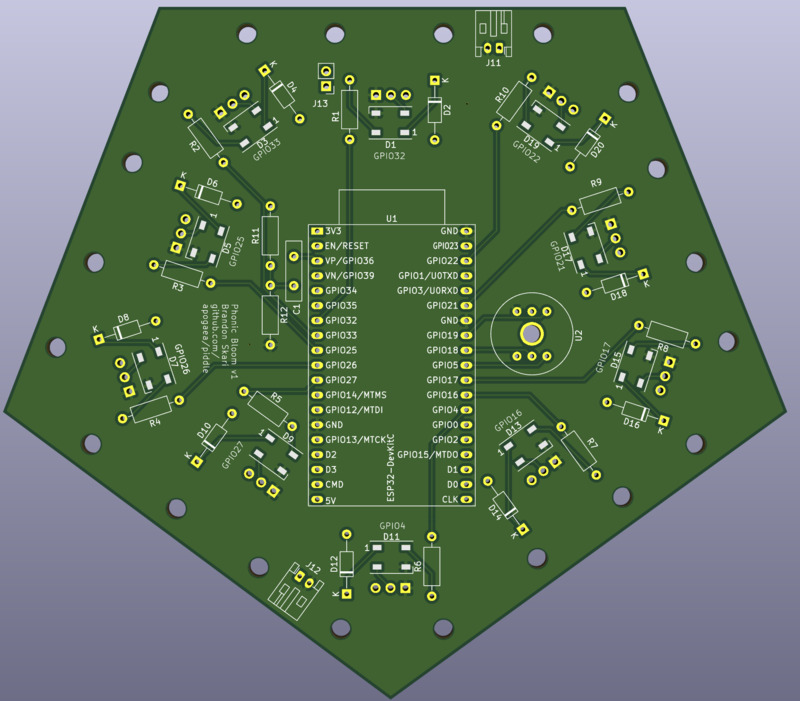
The Arduino emits 3.3V logic, but the LED strips accept 5V logic. With 5V logic, any signal over 70% of the reference voltage is considered high, anything below 30% is considered low, and signals in between are a toss up. Most LED strips will work fine with 3.3V logic as long as the data line is short and the Arduino is receiving a steady 5V. I don’t want to take chances though, so I have added a single LED on the board inline between each LED strip. This LED is powered through a diode, which has a forward voltage drop of 0.7V, so it’s running on 4.3V. That is well within the margin for 3.3V logic, and its output fits within the 5V logic margin. It’s basically acting like a logic level converter. The LEDs are also useful for testing without needing to hook up full LED strips.
Selecting components for placement on the board seems complex. JLCPCB has a pretty extensive list of parts, but picking the right one and setting it up for automatic placement seems like a lot. I’m just going to add some through holes and solder some generic components.
I will solder 4 pin connectors around the outside so I only need to plug in the LED strips. Because solder joints are not very strong, I added some large mounting holes on the board so that I can zip tie the connectors to the board.
I’m going to order from JLCPBC. They have good reviews and are surprisingly cheap. KiCad has tutorials about how to prepare your board and files for manufacture.